4
Telework and
Technology
One main theme of this book is that a substantial amount of telework can be accomplished effectively with only a telephone, paper and pencil as the relevant technologies. Yet, application of more sophisticated technology generally makes life easier, increases the amount of telework one can do, and makes telework available to more people. Furthermore, many, if not most, contemporary information workers now use computers and telecommunications every day. This chapter is about the impacts of technology on telework.
¢ General Rules of Technology
We don’t discuss the technology here at the level of detail of brand names, model numbers, or prices. The reason is simple. Information technology (computers and telecommunications) improves, in terms of performance per dollar spent—or decreases in cost per unit of capability, at an annual rate of between 25% and 30%. That is, the universal cosmic gadget that you paid $400 for this year will probably sell for about $300 or less next year, if it isn’t already obsolete. So, the process of turning a manuscript into a book that is manufactured and widely distributed, fast though it is, is too slow to keep up with technology details. Any market details printed here would be out of date by the time you read them. (However, you can get a better feel for what’s happening now by checking NetworkWorld’s teleworker pages.)
If a certain form of information technology is available today, but costs twice as much as you think you can afford to pay, wait a couple of years; it will be down to your price threshold. If it currently costs ten times as much as you think you can afford, wait about seven years.
This is simply a restatement of the trend mentioned in earlier paragraphs.
In Rule One we’re talking about hardware technology; things like mainframe-, maxi-, mini-, and micro-computers; telecommunications media, such as fiber optics lines and satellite dishes; and all the gadgets that plug into them. Software tends to follow more obscure rules. Suffice it to say that the great new software package that will finally help you to do that tricky part of your job will take from two to five times as long to appear as the manufacturers initially claim. Hence the well-deserved term vaporware.
Nevertheless, the software will finally show up, and of a quality sufficient to make it worth your investment. This leads to Technology Rule Two:
Always buy the best technology available to accomplish a certain job, even if it stretches your budget slightly. It is at least a partial guarantee that the technology will still be usable in three years. Don’t count on more than a three to five-year useful lifetime for computers or telecommunications interface equipment (such as modems), for other than very routine[1] information tasks—even though the IRS hasn’t yet recognized this fact of life..
However, all of the foregoing doesn’t really have much impact on the fundamental teleworkability of large numbers of jobs. It does have a major impact on some jobs, specifically those that need the latest high-powered hardware and software to keep ahead of the game. But computer power in 2001 is more than adequate for the vast majority of information tasks. This leads to Technology Rule Three:
The absence of a particular technology, beyond the fundamentals, is rarely a reason (or excuse) not to telework. Almost everyone can telework at least part of the time without any form of “advanced” technology. However, improvements over the fundamentals may enable both significant qualitative and quantitative improvements in telework.
All of the rules above have to do with deciding the level of technology required in a closed system. By that we mean, all other things being equal, you only have to worry about Rules One through Three. But, in many situations it is not the case that all other things are equal; you exist in a competitive environment. If you are in that situation, you also have to consider Technology Rule Four:
Given equal human and economic resources, the person who has the technology best suited for the job wins. If you are able to do the work faster, with higher quality, at lower cost, or with less strain than your competitor, then you have a competitive advantage. The key question: is the cost of the additional technology (including training) less than the value of the increased competitive advantage? If it is, then the expenditure could be warranted.
 At the same time, don’t forget that new
technology can have a price significantly beyond its purchase cost: time. First, it takes time to learn how to
use it to do the tasks for which you purchased it. Often, the technology fails
to meet your expectations in one or more respects. As a result, less time than
expected is shaved from those established tasks that the technology was
supposed to help. In extreme cases, that user surliness may make you take even
longer to do the task with the “improved” technology than without it.
At the same time, don’t forget that new
technology can have a price significantly beyond its purchase cost: time. First, it takes time to learn how to
use it to do the tasks for which you purchased it. Often, the technology fails
to meet your expectations in one or more respects. As a result, less time than
expected is shaved from those established tasks that the technology was
supposed to help. In extreme cases, that user surliness may make you take even
longer to do the task with the “improved” technology than without it.
Second, it takes even more time to invent new things to do with the technology, or to learn how to do them. Third, the cost of producing the “improved” results may exceed the benefits received. How many times have you spent extra minutes or hours at the computer unnecessarily tweaking that letter or spreadsheet, with no discernible difference to the famous bottom line?
But telework does have an effect on that process, as stated in Technology Rule Five:
Telework generally decreases the start-up costs of adoption of a new
technology; computer-based technologies in particular.
This is partially the result of greater accessibility. Many offices still have fewer than one personal computer per computer user. In those cases, at least for home-based teleworkers who have personal computers at home, learning the new technology—and inventing new applications for it—is done mostly at home rather than in the principal office.
I have been told repeatedly by teleworkers that the ability to try a new technology at home, without the fear of embarrassment by the snickering power users at the principal office, can be a powerful incentive to someone who is technology-wary. Hence, the learning and innovation time is significantly compressed. This is one of the components of the improved effectiveness demonstrated by teleworkers. Further, the increased emphasis on specifying results (rather than concentrating on a specific procedure that may or may not produce the results) tends to diminish the amount of time wasted in output overkill. Rule Five is particularly important in organizations that ordinarily under-train their employees; that is, most U.S. organizations.
Technology Rule Six is critical:
The technology needed for full-scale successful telework is roughly the
same as that required in the principal office—plus some more
telecommunications.
No magic here. If you regularly need it in the office, you will probably need it in the home office or telework center. The hidden benefit here is that there may be no need for duplicate technology. A combination of “older” technologies, such as voice mail and paging, combined with computer sharing in the principal office, possibly with removable hard disks for teleworkers and/or teleworker ownership of their own machines, can make the actual startup cost of technology for teleworking range from quite low to nonexistent.
You should also keep in mind Technology Rule Seven:
Telecommunications networks are the freeways of telework.
If your organization is not extensively intra-connected by digital telecommunications networks now, it soon will be, if it is to stay in business. The emergence of increasingly sophisticated telecommunications networks—and increasingly uniform international telecommunications regulatory policies—will make telecommuting and teleworking practical for almost all information workers around the globe in the next decade (or so)[2]. The Internet in particular has changed everything.
Telecommunications networks for telework can range from the familiar ubiquitous public switched telephone network (PSTN) and all its generally available services (call forwarding, conference calling, call waiting, voice mail, paging, caller identification); plus various forms of mobile telecommunications; through the all-digital ISDN (Integrated Services Digital Network) system or switched digital services interconnecting both individuals and arrays of LANs (Local Area Networks); to the next steps: DSL (Digital Subscriber Line), cable modems and ATM (Asynchronous Transfer Mode). The mode of telecommunications can be as simple as voice only, or escalate through voice-and-graphics, and various forms of synchronous and asynchronous teleconferencing. Each of these technologies generally follows Technology Rule One, so that a technology that seems to be out of reach today could be business-as-usual in a decade or less.
Finally, lest you get overly excited by all the possibilities out there, observe Technology Rule Eight:
There is no substitute for uniform company technology standards.
At a minimum, the software used by teleworkers should be file-compatible[3] with the software in the principal office. For example, if the principal office uses Macintoshes and one or more teleworkers use PC-compatibles, or vice versa, make sure that one end or the other has software that allows transparent file transfer, either by floppy disk or modem. This problem will recede as (and if) more software becomes platform-independent, but it is a common issue in many organizations today.
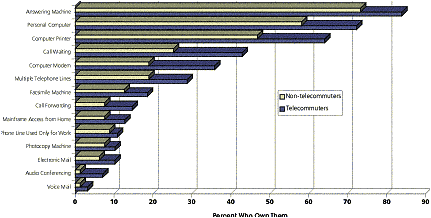
Figure 4.1 Technology Ownership Rates
Keep these rules in mind—or on your wish list—as you decide what technology is required for a given level of teleworking.
¢ Reality Tests
Brief descriptions or statements of the type of technology needed for telework are scattered throughout this book. The rules just given cover types of technology needed to perform various teleworking tasks. Now, let’s see what is happening at present in non-high-tech, real world organizations.
First, look at some of the results of a survey of a few hundred telecommuters and non-telecommuters, mostly mid-level managers or professionals, concerning the utility of certain types of technology to their work. One test of the importance of a technology is the extent to which it is personally owned/paid for by the telecommuters. Figure 4.1 shows the status late in 1992 for a group of -home-based telecommuters and non-telecommuters in a large U.S. metropolitan area, all working for the same large organization. On average, these telecommuters had been working from home for about one year at the rate of slightly more than one day per week.
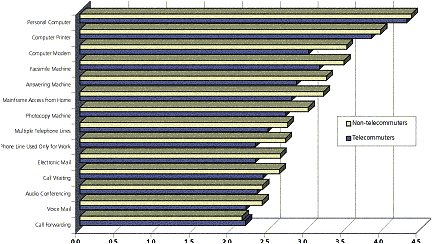
Figure 4.2: The ability of technology to make work easier
The results in Figure 4.2 must be viewed with some reservations because not all of the technologies, such as voice mail and electronic mail, were readily available to the participants in the survey. Voice mail in particular tends to enhance teleworking in organizations that have it generally available—yet it is not usually owned by the teleworkers. Further, the survey respondents’ jobs covered a very wide spectrum. Some job types are much more dependent than others on a specific technology. Note that price does not seem to be a dominant factor here. Although the most-often-owned technology is answering machines (underlining the importance of voice messaging); personal computers and printers, costing several times as much, rank second. This also demonstrates Rule Six: 74% of these telecommuters owned their own personal computers at the time the survey was made. At the beginning of telecommuting for this organization, half of the applicants already owned their own personal computers.
We also asked the same people how much easier each of these technology types would make their work. The results of that question are shown in Figure 4-2. The scale ran from 1 (it has no effect on my job) to 5 (it makes my job significantly easier).
The clear conclusion from these figures is that personal computers, their main peripherals (printers and modems), and facsimile machines should be key components of the future telecommuter’s equipage. The differences shown in Figure 4.2 between telecommuters and non-telecommuters are statistically significant only for modems, a further check on Rule Six.
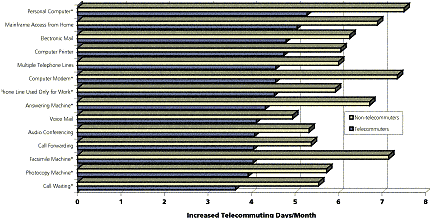
Figure 4.3 The expected impact of technology on increasing telecommuting
Finally, these same telecommuters and non-telecommuters were asked their opinions as to the impact of each of these technology types on increasing the amount of telecommuting they might do from home. The results are shown in Figure0-3. The asterisks after the names of the technologies indicate that the differences between telecommuters and non-telecommuters are statistically significant.[4]
The interesting conclusion to be drawn from the graph is that non-telecommuters have expectations of the effect of technology that are not met in reality. Although both groups feel that added technology would increase the amount of telecommuting that is possible for them, experienced telecommuters are more conservative about the likely extent. This is an empirical test of Rule Three above; lack of a particularly nifty technology may not be as impairing as you might think.
¢ Technology Trends
The previous material concerns the situation in an average-tech organization in the early 1990s. There are some very high-tech organizations using teleworking, as well as some almost no-tech outfits. All of these are successful in the teleworking they do. But, as stated earlier, there seems to be a connection between the level and scope of teleworking in an organization, and the level of technology they use. Here are some general statements about trends in technologies that are particularly suited to telecommuting and to that broader application, teleworking.
Ø Computers
Although about one-third of telecommuters in the late eighties could telecommute at least one day per week without computer assistance, that number has been steadily eroding. Teleworkers are increasingly likely to use computers while teleworking simply because the percentage of information workers who use computers daily in traditional offices is growing.
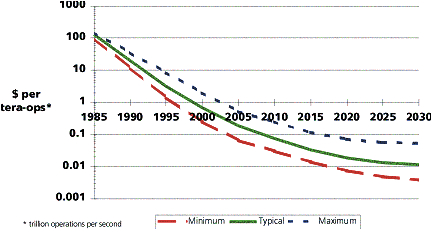
Figure 4.4: Performance improvements of microprocessors
Technology Rule One is the main motivator for this. Personal computers are delivering unprecedented information processing power to the desktop, regardless of the location on the desktop. By the year 2000, personal computers will be able to perform almost any task that was mainframe-based in 1990 (with the possible exception of serving out terabytes of data on line). All of this stems from the growth in power of microprocessors, the “brains” of personal computers. Figure 4.4 tells the story. Similar trends hold for any microelectronics devices, such as memory chips.
In effect, this means that, for most kinds of jobs, the jobholder can soon (if it hasn’t happened already) have all the information resources of the principal office at home or in a telework center. Where the telecommunications network can’t support enough information transfer, work can be carried between the principal office (if it still exists) and the telework office via some magnetic or optical storage medium. The number of options for this information transfer is continually growing: floppy disk, Zip™ disk, removable hard disk, recordable/erasable CD-ROM, WORM disk, and PCMCIA[5] storage card, to name a few.
 Another critical
outcome of this microelectronics capability growth is desktop video
conferencing. That is, the average desktop or laptop personal computer can now
display the boss and/or the rest of the gang at the principal office in living
color, full motion, and stereo sound, given the proper network connections. In
1997, the cost of this form of point-to-point desktop videoconferencing using
ISDN was about $1,400 per seat. By or before the year 2000, look for a price of
about $500 per seat. Of course, videoconferencing at lower resolutions and
frame rates can now be had, using ordinary phone lines, for under $250 per
seat.
Another critical
outcome of this microelectronics capability growth is desktop video
conferencing. That is, the average desktop or laptop personal computer can now
display the boss and/or the rest of the gang at the principal office in living
color, full motion, and stereo sound, given the proper network connections. In
1997, the cost of this form of point-to-point desktop videoconferencing using
ISDN was about $1,400 per seat. By or before the year 2000, look for a price of
about $500 per seat. Of course, videoconferencing at lower resolutions and
frame rates can now be had, using ordinary phone lines, for under $250 per
seat.
Is this an improvement or what? Now the boss can resort to the classical fallback management technique: call all the teleworkers and see that they look busy. More to the point, lack of visual contact will no longer be an excuse for prohibiting teleworking.
Further, with multipoint videoconferencing[6] many meetings can be held with all of the participants “present” and no two of them occupying the same room. Will the outcomes be the same as in traditional, everyone-in-the-same-room meetings? We don’t know the full answer to that yet, but some outcomes will be better, if only because many meetings would otherwise not be possible, given the schedule and location conflicts of any group (larger than two) of busy people.
The danger of all this information processing power is that now we can make major mistakes with lightning speed. However, that danger is common to all users of personal computers, not just teleworkers. Many teleworkers have told us that they are far less likely to make computer mistakes while teleworking because of the major decrease in interruptions, as compared to life in the traditional office.
¢ Telecommunications Networks
Telecommunications networks are the freeways of teleworking. At present there are two broad kinds of networks: local area networks (LANs and wide area networks (WANs. As the names imply, one concentrates on shipping information around a relatively restricted area, while the other has a much broader scope. You have been using WANs for a long time; the most common WAN is called the telephone system. The problem is that these two kinds of networks encompass a bewildering array of different and often incompatible technologies, from good old analog voice transmission at 3 kHz to digital data transmission at gigabit-per-second[7] rates.
As far as telework is concerned, the fundamental question is, what has to be telecommunicated? The answer, for most late-1990s teleworkers, is voice messages, text data and numbers that have been generated “off line.” In both of the latter cases, the text and data are represented on the computer by a small number of bits per information element. Therefore, none of these modes of information transfer requires much in the way of transmission capacity. However, that relatively simple demand on the transmission medium is changing.
One of the key forces for increasing
performance demands on telecommunications networks results from the trends in
computers:  the
move toward high-resolution graphical user interfaces (GUIs—pronounced
“gooeys”). A GUI can require thousands of times more data than a system that
just transmits codes for characters that are displayed on the screen via a
character-memory chip. That is, where a DOS character-mode system simply
transmits a byte for each character that is displayed on the screen, a GUI
system must transmit a picture of that character. Much more complicated. In
addition, GUI systems generally employ color (which further triples the data
load) and increasingly complex graphics, so that a super VGA screen requires
about 2.4 million bits of data (1024×768×3) to display one screenful of
information. It needs to do this about 70 times per second. This can be a
problem. Even with a modem transmitting at 28,800 bits per second, a GUI
interface with a distant LAN can seem painfully slow if the software requires
this rate of screen updating.
the
move toward high-resolution graphical user interfaces (GUIs—pronounced
“gooeys”). A GUI can require thousands of times more data than a system that
just transmits codes for characters that are displayed on the screen via a
character-memory chip. That is, where a DOS character-mode system simply
transmits a byte for each character that is displayed on the screen, a GUI
system must transmit a picture of that character. Much more complicated. In
addition, GUI systems generally employ color (which further triples the data
load) and increasingly complex graphics, so that a super VGA screen requires
about 2.4 million bits of data (1024×768×3) to display one screenful of
information. It needs to do this about 70 times per second. This can be a
problem. Even with a modem transmitting at 28,800 bits per second, a GUI
interface with a distant LAN can seem painfully slow if the software requires
this rate of screen updating.
Ø Wide Area Networks
The first thing to remember is that good old analog transmission is going away; the telephone system is going digital worldwide, although the transition process may extend into the twenty-first century. The most common telework telecommunications appliance today is the modem. Its sole purpose is to convert the digital output of a computer to analog signals capable of being transmitted on the telephone WAN and vice versa. Various tricks can be used in this process so that a phone line limited to voice transmission (nominally covering the frequency range from 300 Hz to 3 kHz) can be stuffed with 14.4 kilobits per second or more—but not much more. Connecting a high-end personal computer to a modem is sort of like connecting a fire hydrant to a garden hose—lots of ambition but not much production.
The replacement to the Plain Old Telephone System (POTS or PSTN, for you acronym fanatics) is, first, ISDN (Integrated Services Digital Network) then ADSL (Asymmetric Digital Subscriber Line), frame relay and ATM (Asynchronous Transfer Mode). All of these WAN technologies are totally digital and deal with message switching. One consequence of this is that you get to throw away your modems and replace them with other interface devices that plug into the phone lines. The more important consequence is that you can send any kind of information over the same telecommunications line—voice, computer data, video—and have it received reliably at the other end, assuming, of course, that the other end knows what to do with it.
Table 4.1: Alternative data transmission media
|
|
|
|
|
|
Transmission limit |
|
POTS (28.8 modem) |
point to cloud |
1 |
28.8 |
28.8 |
None |
|
ISDN |
point to cloud |
|
|
|
18,000 ft. |
|
US BRI |
|
|
|
|
|
|
B channels |
|
2 |
64 |
128 |
|
|
D channels |
|
1 |
16 |
16 |
|
|
US PRI |
|
|
|
|
|
|
B channels |
|
23 |
64 |
1472 |
|
|
D channels |
|
1 |
64 |
64 |
|
|
European PRI |
|
|
|
|
|
|
B channels |
|
30 |
64 |
1920 |
|
|
D channels |
|
1 |
128 |
128 |
|
|
T-1 |
point to point |
1 |
1544 |
1544 |
None |
|
T-1C |
point to point |
1 |
3152 |
3152 |
None |
|
T-2 |
point to point |
1 |
6312 |
6312 |
None |
|
T-3 |
point to point |
1 |
44376 |
44376 |
None |
|
T-4 |
point to point |
1 |
274176 |
274176 |
None |
|
E-1 (Europe) |
point to point |
1 |
2048 |
2048 |
None |
|
ATM |
point to cloud |
|
|
|
|
|
Minimum |
|
1 |
1544 |
1544 |
|
|
Maximum |
|
1 |
622000 |
622000 |
|
|
HDSL (single pair) |
point to point |
|
|
|
12,000 ft. |
|
Downlink |
|
1 |
768 |
768 |
|
|
Uplink |
|
1 |
768 |
768 |
|
|
ADSL |
point to point |
|
|
|
12,000 ft. |
|
Downlink |
|
1 |
6000 |
6000 |
|
|
Uplink |
|
1 |
64 |
64 |
|
|
IDSL |
point to point |
1 |
|
|
20,000 ft |
|
Downlink |
|
|
144 |
|
|
|
Uplink |
|
|
144 |
|
|
|
SDSL |
point to point |
|
|
|
12,000 ft. |
|
Minimum |
|
1 |
160 |
160 |
|
|
Maximum |
|
1 |
2048 |
2048 |
|
|
G.SHDSL |
point to point |
1 |
|
|
24,000 ft. |
|
Minimum |
|
|
144 |
144 |
|
|
Maximum |
|
|
2048 |
2048 |
|
|
DSVD |
point to cloud |
1 |
28.8 |
28.8 |
None |
|
SONET |
point to cloud |
|
|
13220000 |
None |
|
Cable modem |
point to point |
1 |
135 |
135 |
None |
ISDN networks are in place in many countries around the world and by the year 2000 covered most developed countries. Frame relay is a public data network service that can run at speeds up to 1.5 megabits per second. DSL, with ATM, promises to be the next major step past ISDN. It provides expanded capabilities, but may be a decade or more away from widespread implementation. Table 4.1 provides a rundown of some available options. The primary drawback of DSL is that it has limited range, typically two miles (as the wire goes, not as the crow flies) from the central office. A new version of DSL, G.SHDSL, promises to double that range but is not likely to show up in Europe before 2003—or in the US before 2004. Finally cable modems, with very wide band download capability, but limited upload capacity, may also show up in some areas. Add satellite data communications to this array to complete the picture.
Aside from the message handling software that constitutes the bulk of ISDN, DSL, and ATM technology there is a parallel trend toward replacing copper wires with optical fibers—at least up to “the last mile” before it gets to your home. The motivation is the same as that behind ISDN and ATM developments: increasing capacity—attaching the fire hydrant to a fire hose (the optical fibers) and putting a wetting agent in the water (ISDN and ATM). As of this writing, an interesting contest is developing over who will deliver this capacity to the end users, the established telephone system or cable companies. As of mid-2001 the outcome is still uncertain: cable is ahead but DSL is gaining.
If this isn’t confusing enough, Northern Telecom, Ltd. (Nortel, with its 15,000+ telecommuters) and United Utilities, of Canada and the UK, respectively, have announced a system for providing megabit per second Internet access to homes via conventional electric power lines at rates comparable to those of more conventional Internet Service Providers. However, as of October 1997, there were no plans to provide the services in the US.
For mobile teleworkers, such as people on business trips, sales and technical support representatives, field engineers, etc., telecomm technology has also gone digital. With PCS (Personal Communications Service) in the U.S. and GSM (Global System for Mobile) in most of the rest of the world (the two will merge in coming years), mobile digital communications will be ubiquitous. In fact, mobile communications are usually the least capital-intensive way of bringing telecommunications into rural areas and developing countries.
Added to the ground-based mobile systems are at least nine global two-way communications satellite systems scheduled for operation over the next few years. The Motorola-backed Iridium satellite system already has launched part of its complement of 66 satellites operating at an altitude of 420 nautical miles. Table 4.2 shows the list of options as of this writing.
Finally, the global trend in privatizing telecommunications carriers promises to open competition and eliminate many of the artificial telecomm costs. Whatever the outcome, look for a rapidly growing ability to send any kind of information to anywhere—and from anywhere—at a reasonable price.[8]
Table 4.2: Planned telecommunications satellite systems
|
|
|
|
Operating
Altitude |
Service
Start Date |
|
Teledesic |
High-speed data, teleconferencing |
288 |
|
|
|
Iridium |
Voice, fax, paging |
66 |
420 nm |
Mar-2001; new ownership after bankruptcy March 2000 |
|
SkyBridge |
Data |
64 |
|
|
|
Celestri |
Data, broadcast and video |
63 |
|
Merged with Teledesic |
|
Globalstar |
Voice |
48 |
~ 400 nm |
late 1998 |
|
Ellipse |
|
17 |
medium |
late 2000 |
|
Odyssey |
|
12 |
medium |
2001 |
|
Constellation |
|
44 |
low |
before 2005 |
|
ICO Global
Communications |
Voice |
12 |
Medium |
2000 |
|
Source: Wall Street
Journal, 17 June 97, A3; 19 Aug 97, B3 |
||||
The public telephone networks aren’t the only forms of WAN. There are many other types, from private networks (PNs) under the control of single organizations (such as the State of California’s internal telephone system) to national or global public meta-networks such as America Online, AT&T Mail, CompuServe, MCI Mail, Prodigy, and Internet. While the public telephone networks, and many private networks, include both hardware (the wires/fibers, communications satellites, microwave relay stations, switching centers, etc.) and the operating organizations, the meta-networks typically operate on top of the public switched networks. The public meta-networks typically offer a variety of services, from electronic mail to travel planning. For telework purposes, the electronic mail possibilities of these networks are probably the most compelling.
Ø Local Area Networks
Local Area Networks are the main means for high-speed, intra-office telecommunications. LANs have grown from a rarity in the mid-1980s to the common means of communications among members of work groups who use personal computers. LANs communicate between personal computers at multi-million bits per second rates. However, the problem with LANs for telework is embodied in their name: they are truly local in the geographic sense, while teleworkers are not.
The first step in solving this problem comes when one of the personal computers in a LAN acts as a telecommunications server. That is, it is connected to the network and, via one or more modems, to the telephone system. Teleworkers can dial in to the LAN communications server and get access to the files of their workgroup. Unfortunately, the teleworkers are limited in the rate of data transfer by the capacities of their modems; the fire hydrant-garden hose problem again. As the WANs go digital, however, this problem will diminish significantly.
Ø The Internet and Intranets
The Internet, a well-kept secret among the military and academic communities for two decades, exploded into public consciousness in 1993 with the introduction of the World Wide Web and MOSAIC, the first GUI Web browser. In just a few years, the Internet has changed the course of the computer industry and materially altered the possibilities for teleworking.
In particular, the Internet has allowed major expansion of the working horizons of small- to medium-sized businesses or any other organizations that could not afford extensive private telecommunications networks. For more on the possibilities, see chapters 10 and 13. Further, by making telecommunications contact with vendors and clients a matter of daily experience in many offices, the psychological barrier to acceptance of teleworking is greatly diminished. It is a smaller step to go from Internet interaction with a vendor or client to doing the same with fellow employees.
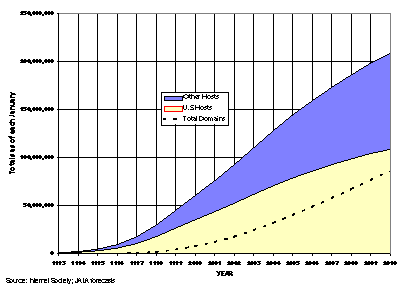
Figure 4.5: Projected growth
of the World Wide Web
At the minimum, expansion of a company’s network to the Internet simply requires the addition of browser software to the arsenal of telecommunications technologies. This will give employees access to the Internet. Toward the maximum end, a company can have its own Internet servers, connected directly to a local ISP (Internet Service Provider) or even one of the Internet backbones. This step can involve extensive technology investments as well as the cost of full-time wide-band telecommunications interconnections.
Intranets generally differ from the Internet only in that they are isolated from it. That is, a company with multiple facilities could have its own private telecommunications network interconnecting the facilities and providing Internet-like access to all its employees without ever being connected to the Internet. More typically, companies with Intranets are also likely to have Internet access as well. Additionally, companies can have the security advantages without the cost of private Intranets through the use of VPN (Virtual Private Network) technology that uses Internet carriers but isolates the company’s communications traffic from the Internet.
Some more jargon is appropriate here. Each computer that provides data to the Internet is called a host. Each separate site on the Web is called a domain and is distinguished by an address that is composed of at least the domain name, possibly some sub-domains, and either the type of site or country in which the site is located, or both. For example, JALA International’s web site address is “www.jala.com.” In this case, the www signifies that this is a World Wide Web site for the commercial (com) organization jala. Figure 4.5 gives an indication of where the Web is going in the next few years.
The fundamental message to the information industry of this growth rate is: if you don’t have a Web address, you don’t exist. The ability to interact on the Internet will be an absolute requirement for commerce in the 21st century.
¢ Software
 One
of the means of reducing the demands on the physical transmission of all that data
is through recognition that much of it is redundant. This is particularly the
case for graphics, and especially video. So, a variety of software packages
have been developed, with more advanced ones continually appearing, that
compress the data into much more reasonable lengths. So, what seems at first
like a hideous problem, sending two million bits of screen information at the
rate of seventy times per second, becomes much more tractable; only the changes
from screenful to screenful are transmitted.
One
of the means of reducing the demands on the physical transmission of all that data
is through recognition that much of it is redundant. This is particularly the
case for graphics, and especially video. So, a variety of software packages
have been developed, with more advanced ones continually appearing, that
compress the data into much more reasonable lengths. So, what seems at first
like a hideous problem, sending two million bits of screen information at the
rate of seventy times per second, becomes much more tractable; only the changes
from screenful to screenful are transmitted.
The result is that the conversion to digital transmission technologies promises to allow enormous expansion in the ability to transmit information between computers at low cost.
One of the most promising, if ill-defined, areas of software development is in what is known as groupware. Groupware’s goal is to effectively interconnect work groups, regardless of the location of the individual group members. First evolving on LANs, groupware usually migrates to WANs as well, allowing those connections to be global as well as local. The fundamental component of groupware is some form of electronic mail, e-mail.
E-mail allows any member of the group to send messages to any other member, at any time. No big deal? Ah, but the point is that the recipient need not be at his computer when the message is sent; it will patiently wait until she shows up. The Death of Telephone Tag. Furthermore, the sender can require a receipt verification as part of the message, so that there is no question about whether the intended recipient got the message.
For example, I get many e-mail messages via Internet from researchers around the world. Typically, those messages are sent when I am not in the office. This saves not only time, but nerves. If a colleague in Indonesia were to phone me in mid afternoon Jakarta time, I would not be ecstatic; it would be around 1:00 A.M. in California. Conversely, my calling her in mid-afternoon, LA time, might wake her from a sound sleep. The asynchronous nature of computer communications can be a significant asset to teleworking.
Facsimile works almost as well as e-mail, unless you want to keep the messages in digital form for further work or retransmission. This confinement to all-digital formats is particularly important when the group is jointly working on documents, spreadsheets or graphics. Conversion back and forth from analog (fax) to digital form can chew up huge amounts of time—as well as add to the paper storage problem.
Advanced groupware, such as Lotus Notes—the premiere form of groupware, includes the tools for many such types of interaction. The trend toward multi-media (another ambiguous term) for personal computers increases the likelihood that video conferencing will be almost a standard item on mid-cost personal computers in the late 1990s. Electronic white board software allows group participants to share drawings and sketches, hand-written notes, and other jottings, either live or asynchronously. The main types of Web browsers from Microsoft and Netscape now also include some form of groupware.
Note that the preceding has concentrated on interconnectivity software. One other aspect of software is important for telework costs: duplication. Part-time teleworkers often have the same software at home—and/or on their personal computers at the telework center—as that on their personal computers in the principal office. Many, but not all, software manufacturers allow duplicate copies of their software to be kept on different machines, as long as no more than one copy is being used at a time. Other manufacturers insist on having separate licenses for each machine, regardless of the use patterns. This variance in software producer approaches causes severe hair tearing on the part of conscientious company information system managers. Hence, these usage rules will also evolve to a more standardized form (remember Rule Eight?) as telework becomes an increasing presence in the work force.
In short, as new computer software becomes available for the traditional office, it will likely work as well in homes. Already, technology is not the problem for most teleworkers.
¢ Security
One of the main concerns organizations have about distributed work situations like telework is that company-private information may somehow get into the wrong hands or otherwise be compromised. This could happen either intentionally—the perpetrator is an employee who wants to damage the company—or unintentionally. As an example, a report in the trade magazine PC Week[9] discusses the claim that the annual disappearance rate of the notebook computers of a company’s sales personnel is 8%. This is not believed to be the result of sheer carelessness; the sales people are very protective of the machines. Rather, the disappearances are imputed to competitors’ attempts to get access to the company’s main computers or to get the sales data that is stored in the notebook computers, or both.
The point is that sensitive company information is easiest to protect from outside intruders if it is kept securely locked in the company’s vaulted, main office computers with no access allowed from the outside. This is true, but irrelevant in today’s economic climate. It is not possible to totally exclude outside access to the data while operating in a teleworking environment, as most companies must. Teleworkers could be restricted to using only non-sensitive data while they are teleworking but that would ultimately restrict the amount of teleworking—and its benefits—available to employees. Fortunately for teleworkers, the massive acceptance of the Internet has forced many reluctant companies to face up to these problems sooner. Once a general Internet access solution has been found, telework is automatically included in the possible options (whether or not the company realizes it).
The fundamental security rule is the same for everyone:
Hire the best employees, motivate them, train them, give them the best tools,
and keep them informed of security issues.
There are several technological approaches to this access problem, all of which act either to keep the information out of the hands of unauthorized people or to make it useless to them if they do get it.
In a typical situation, the sensitive information is kept on the company mainframe or a LAN. The teleworker accesses it by modem. Several layers of protection can be built in at this point, such as all or some combination of:
· having the telecommunications server either not directly connected to the mainframe or LAN, or examining all incoming data streams for the authorized signatures (that is, the server is a firewall). As broadband home connections become more prevalent, with 24/7 connectivity, it is also vital to have teleworkers’ home PCs behind firewalls as well.
· For Internet-mediated communications, using a VPN server at the company and a VPN client on each remote computer.
· using “smart cards” that display a password that changes every 30 seconds or so, in synchronism with a password identifier in the computer being called (the teleworker pulls out her smart card, dials up the company machine, and enters the password appearing on the card at the moment)
· using a call back system—assuming all the password routines are completed correctly (many notebook computers have them built into the communications software, which is why they are desirable theft objects), the central computer dials the teleworker’s home or other prearranged phone number
· requiring a positive identification of the caller, such as a retinal scan, fingerprint, or hand shape detector
· ensuring that home-based teleworkers install and maintain the latest antivirus software.
In cases where the sensitive information is stored on the teleworker’s computer, there are two (at least) other approaches to denying access to others. First, the sensitive information can be encrypted. Only the authorized teleworker or others who know the key can decipher it. Quality encryption software is readily available (although there is an on-going battle between the U.S. government and the software industry about the allowable quality of encryption software.[10]
Second, removable hard disks or Zip™ disks allow the information to be kept separate from the computer. Contemporary hard disks are small enough so that they are not bulky packages. Zip™ disks can hold 100 megabytes of data each. Teleworkers can keep them locked up at home or carry them along as they travel between home, a telework center, and/or the principal office. This has other advantages, such as allowing easier sharing of computers in a telework office. Employee A at the local telework center usually has different software and data requirements than employee B who works at the same computer the following day. If both have removable hard disks, the problem goes away. The growth of the PCMCIA standard is allowing this option to be practical even if the hard disks ordinarily work on different machines.
Like many of the so-called technological barriers to teleworking, security is not an impassable one. Nor need it be a particularly expensive barrier to overcome. Yet, any company that is considering—or practicing—teleworking should put some serious thought into the realities of protection of its sensitive information particularly, as noted above, when the teleworkers have always-on connections to the Internet.
¢ Some Remote Access
Infrastructure Options
The general issues just discussed provide the background for some specific examples of telework-support arrangements, together with the key relevant decision criteria. The first issue to be addressed is what sort of access the teleworkers need in order to be effective. The design of the information infrastructure hinges on that outcome. The following sections address the decision elements, options, and impacts on the information system operations, beginning with the simplest cases.
Ø Teleworking with a central facility
This is the case where all the teleworkers need access to some a central facility, typically the company headquarters. This is common for small organizations or large ones in which the teleworkers are all associated with just one facility or campus. In terms of the numbers of teleworkers working in this mode, this is the most common case
Decision criteria
Access frequency. If each teleworker is only intermittently connected to the network, then dial-up connections are called for. This is the typical situation. In some cases, as call frequency and/or duration expands, it may be more economical to set up dedicated lines to those individuals. At present, this is a fairly rare—and costlier—occurrence.
Access scope. In some cases, simple e-mail will suffice. For example, the most common situation is where the teleworker has a complete set of applications software on a PC at his/her work site and simply needs to communicate with clients and/or other work group members via phone, fax, or e-mail, plus send files back and forth. In more complex cases, the teleworkers may need access to most or all of the company’s information services and applications. The scope of access also has implications for the communications bandwidth needed. For simple email transfer a dialup phone line is usually adequate. But for constant, fast Internet access, videoconferencing, and other rich communications needs simple phone connections may not fill the bill.
Security. As always, the dilemma concerns the tradeoff between providing appropriate access to the employees and limiting exposure of the “family jewels” to unauthorized access. This issue becomes particularly intense as more and more employees adopt cable modems or DSL as their wideband communications method. These always-on connections are particularly susceptible to cracking and other forms of intrusion. In those cases it is imperative that the teleworkers’ computers are firewall-equipped and that the firewalls not be modifiable by other than company IT personnel.
The ultimate additional solution to this aspect of the security issue is probably high quality encryption, as discussed earlier. Still, the encryption and decryption processes do slow things down, possibly to the point where the cure may be worse than the possible disease.
Cost. Not all of these options cost the same. In general, the more complex the solution, the costlier it is, both in money and people resources. My experience has been that the greatest danger in starting a telework program is in technology overkill. The cost of a belt and suspenders approach to telework support may be all out of proportion to the value added by extra bandwidth, security, or other technological whiz-bangs. For IS managers faced with estimating a budget for establishing a telework solution, my advice is to think medium for the demonstration implementation, then test it extensively before and during the evaluation period. Possibly the best low-cost security addition is personal firewall and intrusion detection software for each teleworker’s computer (Zone Alarm or Black Ice Defender, for example).
Alternative technologies
Application server-based connection. The company has a mail and/or applications server to which the teleworker makes a direct connection via a modem bank, possibly through a firewall. For example, a Lotus Notes/Domino server could provide e-mail, database, and other applications services to notebook-equipped teleworkers. This could include sophisticated data entry/editing applications and graphics editing as well. Access is restricted to whatever is available through the server. This has the advantage of enhancing security, because of the limited access, and the corresponding disadvantage of limiting availability of some resources needed by the teleworkers as well as generally slow response times compared to some other options.
Remote network node connection. In this case, the teleworkers connect to their organization’s LAN via a remote access device (that also may include, or be connected to, a firewall between it and the network), using Point to Point Protocol (PPP) or Serial Line/Internet Protocol (SLIP). With this technique the teleworker has access to all of the resources available on or via the LAN. This is its primary advantage. The disadvantages of this approach are that security may be more of an issue and the network administration overhead is increased.
Remote access via the Internet. Here the teleworker connects to the company via a local point of presence (POP), supplied by an Internet Services Provider (ISP) unless the company has its own POP. Because of security considerations, it is advisable to use Point to Point Tunneling Protocol (PPTP) in this connection; this is the technology adopted by Microsoft for the VPN capbilites of its various Windows platforms. As in remote network node connection, the teleworker has full access to the company network, including file sharing, printing, and network-located applications packages. This approach is particularly important in cases where the teleworkers are not telecommuters charges are primarily for local phone calls. The disadvantages are those of remote network node connection plus whatever restrictions the ISP may place on the options, such as not supporting PPTP or ISDNaccess. (are you acronymed out yet?). However, VPN servers have become relatively inexpensive, either as standalone boxes or, as the ultimate in low cost, via a Linux box acting as the VPN server for the entire company.
Remote control. The teleworker has direct modem access to one or more central office personal computers, via a common software package such as LapLink or pcANYWHERE. This gives teleworkers access to whatever is accessible to the host PC(s) which could be the same as the remote network node connection, with the PC acting as the remote access device. One fundamental difference between remote control and the server-oriented options is speed; most remote control packages only transmit screen changes, while server options that repeatedly transmit entire screens are significantly slower.
Hybrids. Systems that work to combine the desirable features of all the previous options while reducing the undesirable ones are beginning to appear. For example, Traveling Software’s Point B™ product suite uses several techniques to compress files, minimize hard disk access times, restrict transmissions to changes, and anticipate data flow so that redundancy and connect times are minimized.
IS Impacts
The IS (information Systems) manager has to juggle the various cost and quality factors in these options. For example, if ISDN connections are available, then the system lethargy factor of server-based options may not be important, given the enhanced control over security. If security is the primary consideration, then application server based access may be the best choice and remote control should either be very limited or closely monitored—adding further administrative burdens.
One security option in the remote control case is to ensure that the host PCs do not have network access. Unfortunately, while quite suitable for activities that can be confined to use on a single PC, this approach may unduly limit some teleworkers.
An important factor to consider in designing a teleworker interface is the likely access traffic of the teleworkers. Most teleworkers will be spending less than an hour per day accessing the network—some of them far less—while a few (such as system programmers, people who need constant database access, etc.) may need high levels of access. It is a good idea to have separate high and low load access points, possibly with dedicated modems for the high loads. In the low load cases, one element in the evaluation phase of a telework demonstration project should be a process for testing communication loading. As a first approximation, one modem per ten teleworkers might be sufficient.
Ø Distributed facilities
In cases where an organization has more than one facility, then further telework options arise. One of these is to allocate some space in one or several facilities as telework center space. Another is to help minimize (or just keep track of) telecommunications costs by assigning inward WATS numbers for serving nearby teleworkers.
Decision criteria
Inter-site access. Quite often, multi-site organizations have a certain amount of electronic interchange traffic just for ordinary, in-office business. Adding teleworkers to this mix may simply increase traffic between some sites, generated by teleworkers who work near site A but work for an organizational unit in site B (see chapter 10 for details). Similarly, one or more sites may have telework center space, including some additional, more expensive technologies such as high resolution, full-motion, color videoconferencing.
Alternative technologies
Wideband site interconnection. The principal addition to the technologies available at single company sites may be a dedicated wideband link between sites. Pick from among the technologies discussed earlier, with the desired additional bandwidth dependent on the amount of inter-site traffic generated by the teleworkers. Also consider the addition of videoconferencing. Telework may be just the right added use element that tips the scale in video’s favor.
IS Impacts
If the title of Information systems Manager includes telecommunications, then the primary impact is in the need to include telework-generated traffic in the inter-site telecomm design. Keep in mind that, once telework proves to be very successful in a company, demand for new teleworkers will accelerate. This may have the added complication that fewer sites will be needed (more of the employees working form home, more of the time) and entirely new site configurations will be in order.
Ø Access via the Internet
For far-flung organizations, or ones where inter-site telecommunications traffic does not warrant dedicated lines, or where there is insufficient staff to handle complex telecommunications issues, Internet access may be the primary work communications mode. This is quite often the case for small companies, particularly those that employ widely dispersed teleworkers. The general arrangement is shown in Figure 4.5.
Decision criteria
Make or buy. A fundamental question in this case is: do we have enough staff and resources within the company to handle all of the different telecommunications demands or do we need to outsource part or all of that capability? Given the cost structure of the Internet, it may be hard to ignore its advantages for organizations with even a few distant teleworkers. In fact, for small companies, the Internet is often the ideal medium for connecting workers in the same city because of its ready availability. Another comparable option is to outsource via online service providers such as CompuServe, or some combination of the two options.
Standards. As the number and diversity of teleworkers increases, so does the need for standards in shared/commonly-used applications, especially e-mail. Current Internet protocols limit messages to 7-bit characters. This means that parts of the content of applications and graphics files—which use 8-bit characters—would be garbled unless some form of conversion is used. Unfortunately, there are several varieties of character/data conversion programs available. Hence, Murphy’s Law being what it is, chances are pretty good that your message to Sam, attached to an e-mail message by its own character cruncher, will appear at the other end as an indecipherable string of garbage characters. Uniform communication standards for your teleworkers are crucial.
Security. In
addition to the security issues already discussed, the Internet intensifies the
problem of authentication; that is, how can you be really, really, really sure
that the person logging on to your network is actually an authorized
teleworker? Some form of authentication less pregnable than passwords may be in
order here, such as the smart cards discussed earlier.
A- or Iso-chronicity. The Internet uses packet switching as its primary communications mode. This means that each message you send, whether it is e-mail, a file, graphics, or whatever, is diced into small packets, each of which has a destination address, a sender address and an “envelope” containing part of your message. Thus, it is possible that each packet in a message could take a different route to get to the message’s final destination, where it is reassembled (if all goes well) into the original version. Often packet 127 will arrive before packet 3 in this process. This is not a problem if your message elements can be asynchronous. But some message types, such as live audio and video must be isochronous; it is very important that they arrive in the proper order and on time. Although work goes on to allow the Internet to carry such traffic gracefully, your best bet for now is to reserve it for the traditional public switched telephone network (PSTN) or a private network with dedicated lines.
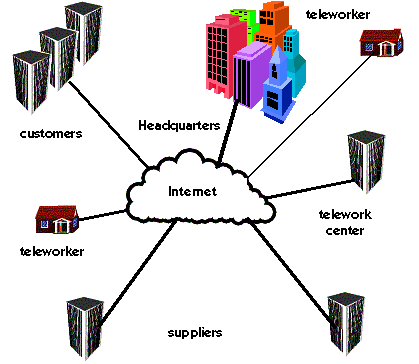
Figure 4.5: Teleworking via the Internet
Alternative technologies
Browsers. The main means of teleworker access to the Internet is via a browser. Microsoft Internet Explorer and Netscape’s Netscape Navigator are the main contenders at present. Internet Explorer is confined to PCs running Microsoft Windows/NT or Macintoshes, while Netscape Navigator is available on a number of platforms including Unix and its variants. Both browsers include e-mail client software. The latest versions also include forms of groupware. The prime criterion is that all of your teleworkers should use the same browser and e-mail software.
Servers. If your company is intent on providing full-time Internet access, to clients as well as teleworkers, then you need to have one or more Internet servers. An Internet server is basically a computer that is dedicated to handling Internet traffic. Server software is available in a broad variety of forms, and for platforms ranging from old PCs with Intel 80286 microprocessors[11] to clustered mainframes. Since a server is basically a 24-hour per day, 7-day per week proposition, the telecommunications cost for a dedicated line to an Internet backbone are likely to be the primary operating costs (other than the people maintaining the system). A substantial fraction of Web servers use the open-source software package Apache, with a growing number of them on Linux machines.
IS Impacts
The make or buy decision may be the critical one here. An entire industry has sprung up, seemingly overnight, to provide Internet access services. Some ISP’s will provide server service, thereby allowing you to share telecomm access with other servers and potentially reducing the communication costs, at the risk of having a server not entirely under your control. The key question is: do you have sufficient spare human, budget, and technology resources, as well as sufficient Internet demand, to handle this yourself or would outsourcing that part of the task be a better option. Still, don’t forget that caveat emptor is the key phrase here; since the ISP industry is very young, has suppliers whose capacity is chronically less than demand, and is populated by many firms that won’t be around next month. As the industry matures, this problem will diminish in intensity, but it will still be around for several years, given the sustained growth rates of the Internet.
Ø Network isolation—real or virtual?
Another approach to balancing the conflicting issues of low-cost free access by teleworkers and strict security for confidential company information is the Virtual Private Network (VPN). The goal is that with a VPN the teleworkers can work via a public network like—but not necessarily—the Internet, while still deflecting attempts by intruders to steal or corrupt company information. The architecture of a VPN is much the same as that shown in Figure 0-5, but there is a difference in the details.
Decision criteria
Complexity. If you either already have a real private network—and find that its costs and complexity are growing out of bounds—or you haven’t the staff or budget to tackle what is essentially the task of running your own phone company, then a VPN may be an ideal solution.
Security. If information security is the paramount consideration, with low-cost access to teleworkers, customers, and suppliers a close second, then VPNs are worth investigating. The market has a growing variety of security options, with various forms of encryption, authentication, and message encapsulation to protect your information.[12]
Cost. A primary attraction of the Internet and VPNs is the possibility of major telecomm costs savings. The level of savings is proportional to the amount of long distance telecommunications you need for your ordinary business and your teleworkers. If your company has leased telecomm lines (i.e., a private network) that are chronically operating below capacity except to peak periods, then you may find substantial savings by using a VPN either for all of your communications or for peak loads on top of a smaller private network. One problem of using VPNs with home-based teleworkers is that of access; some Internet Service Providers, such as Comcast’s @Home service, refuse to allow VPN for home users connected via cable modems because of the bandwidth-hogging impacts. In those cases the alterative is to use DSL, if available, or settle for much slower dialup connections
Alternative technologies
As of this writing, there are no complete, end-to-end VPNs, although a number of hardware suppliers and telecomm service providers are developing pieces of the solution using encryption and PPTP or VTP (Virtual Tunneling Protocol). Service providers include CompuServe, MCI, Netcom, and UUNet Technologies, while all of the primary network hardware providers are working diligently on solutions. The problem, as always in an infant technology, is the lack of standards. However, the apparent de facto standard (as of mid-2001), possibly because of Microsoft’s decision to support it, is PPTP. A number of SOHO-oriented connection methods are now available. The gory details are beyond the scope of this book.
IS Impacts
At present my advice to IS managers is to carefully check the currently available solutions. A well-designed and integrated VPN may well be the key to broad acceptance (or at least the last nail in the coffin of broad denial) of telework.
¢ Technology to Fit the Job
Given the general statements above, what do you really need to have in order to support your own teleworkers? Here are some sample setups for teleworkers in different types of jobs. The minimum requirements are based on Rule Six.
Ø Routine Data/Text Processing
Routine information jobs are often considered to be great candidates for teleworking; the jobs are well defined, as is the output, and it is relatively easy to check results. Most of these jobs are computer-intensive by now, or are on the verge of being computer-based. The key technology issues for teleworking have to do with the means of raw input delivery/distribution and output retrieval. The scale of the operation and the required turn-around times affect the approach to use.
At the small workgroup telecommuting scale, sneaker-net technology may suffice: the data/text processing person takes a stack of entry sheets or tapes home at night and comes in with a floppy disk or two after a day of telecommuting. At the next level of sophistication, the paper forms are sent by interoffice mail to the organization’s facility that is nearest the teleworker’s home for daily pickup by the teleworker. Similarly, dictation could be downloaded to the teleworker’s answering machine. The results are sent by modem to a personal computer or LAN in the principal office. In any of these cases, the teleworkers can either be at home or in a telework center. With a little more technology, an ISDN-equipped teleworker can receive photocopies of documents, such as insurance forms, then return the processed action results to headquarters.
A key reason for failure of this simple situation is also simple: forms fatigue. As an example, a bank terminated a telesecretary program because of the forms hassle. The telesecretaries did indeed produce more accurate letters quicker. Yet the bank discovered that, because of the many different pre-printed forms it used (designed before the PC revolution), it had to employ another person at the headquarters printer to make sure the right form was in the printer when the data arrived from the telesecretary! Solution: use printers (laser or ink-jet) and/or personal computer software that includes all the necessary form formatting information; the printer prints the form and the data simultaneously. Better yet, it is possible to eliminate internal paper usage altogether by scanning all incoming documents, converting them to electronic form, and dealing exclusively with the electronic versions thereafter. Many insurance companies and other members of the financial industry use this method.
Massive order entry systems also are readily adaptable to teleworking. The most often quoted example is that of the J. C. Penney stores’ phone entry operation in Milwaukee. In this case the necessary technology is a telephone distribution system that interconnects the main database functions to individual teleworkers’ homes. Personal-computer-based telecommunications network distribution systems that cover this function are commercially available. SWIFNET, a system developed by World Church of God to manage gift-giving resulting from their church’s TV religious programs, is an example.[13]
Ø General Mid-Level Information Jobs
Many mid-level jobs are less dependent on technology than the routine jobs just discussed. Often, the only additional technology fix needed (aside from what most mid-level people already have at home, as in Figure 0-1) is some combination of an additional telephone line, pager, fax machine, and voice mail or answering machine. For many manager or professional teleworkers, the primary task performed during teleworking is catching up on reading and simple correspondence.[14]
The next step in technology escalation is the addition of a stand-alone personal computer. The primary use of the machine is for text processing, with occasional spreadsheet manipulation and preparation of graphics for presentation coming in second and third. Part-time telecommuters are more likely not to use computer telecommunications, preferring sneaker net—or laptop or notebook personal computers—as the primary means of information transfer. The work results are brought in to the principal office on the non-telecommuting days.
As the technology trends become more pronounced, the use of various forms of teleconferencing and/or groupware will spread. Since meetings occupy a substantial amount of the time of mid-level people, the fraction of time spent in non-face-to-face meetings will increase. Certainly, in organizations where networked PC use is common, mid-level people will need appropriate levels of technology support to increase the amount of their teleworking.
Ø Specialists
The primary differences between specialists and other mid-level teleworkers are likely to be in the horsepower of their computers and/or software, and in the extent of their telecommunications usage. For example, actuaries are likely to need large amounts of data on either a mainframe or CD-ROM (s). Attorneys may need access to legal databases such as LEXIS.™ Architects and engineers may need CAD/CAM software and the highest-end personal computers. Programmers may need almost constant access to the mainframe, although possibly not during peak business hours. Information specialists need access to meta-databases such as DIALOG.™
Ø Teams
One common caveat put forward by prospective telemanagers is that their company relies increasingly on teams, so it’s not possible to telework in those situations. Teams need to be together all the time, they say.
Let’s examine that a little more carefully. Teams often do need to be together. The typical situation is when the team is first getting organized, or when there is some unforeseen problem that needs intensive consultation, or in other situations where information technologies are simply inadequate for the needs of the team members.
But the ultimate purpose of any team is to get some work done; usually this requires a certain amount of independent work by the team members. Furthermore, it is often the case that the individual team members have other tasks that are independent of the team activities. Particularly if the team members are ordinarily in different facilities or, increasingly, scattered around the globe, it is very difficult to get them together all at the same time and place.
Groupware was invented specifically to address this problem. Now, multipoint videoconferencing via ISDN or the Internet can augment the groupware and email interchanges at reasonable prices (under $1,000 per seat).
Ø Sales and Field Service People
Laptop and notebook computers have revolutionized sales and field service techniques and processes in many industries. The prospect of instant access to all the critical information materially enhances the leverage of a sales call. Insurance salespeople can assemble and print policies on the client’s premises. An insurance adjuster can complete the transaction in a single visit, using the hard-disk-stored database of replacement or repair costs. A realtor can display prospective homes in a client’s own home; with advanced, three-dimensional CAD software, the realtor or an architect can even take the client for a virtual “stroll” through the building.
A teleworking sales representative no longer needs a desk in the principal office. Lists of sales prospects can be downloaded to the representative’s home. Final contracts can be printed either by the portable printer or, if a more visually attractive version is wanted, on the laser printer at home. Many large companies have noticed this possibility, in the past year or so, as a powerful means of reducing office space costs. But don’t forget the security issues mentioned earlier.
Ø Senior Executives
Senior executives are the most difficult to get out of an office. They tend to spend much more times in meetings, for the simple reason that they are hired primarily to deal with uncertainty and ambiguity—activities that generally require real face-to-face meetings. However, information technology acts to compress meeting time. A few years ago a senior executive of a large corporation told me that he typically used to spend a whole day discussing business problems at one of the regional facilities he visited. Now, with the ability to resolve a good portion of the routine matters by e-mail and telephone conferencing, the face-to-face aspects of the meetings were reduced to an hour or two. The new problem: what to do with the spare time at the regional centers?
Senior executives also tend to spend more time than average traveling, usually more time than they or their families would like. Like everything else noted above, the coming technological changes can allow the executives to substitute telecommunications for some of the meetings and change their “meeting” location to home from somewhere else.
Senior executives also tend to be significantly less willing to learn to use complex, user-surly software. If they are going to personally use a computer-with-software package, it had better actually be intuitive. Few contemporary systems can make that claim, although the executive gap is closing.